




Data loss on Windows can be a distressing experience, especially if you have lost important files or folders. Whether the file is deleted due to accidental deletion, formatting, system error, or any other reason, it’s important to immediately proceed with the recovery workarounds. If you are looking for different options to recover your lost data on Windows, a free data recovery software can be a lifesaver.
Confused about different Windows data recovery software? Don’t worry – we’ve sorted things for you. In this article, we’ll discuss the top 5 free data recovery software tools that you can try to recover lost data without any cost. We’ll cover the features you need to check, along with the pros and cons of these data recovery tools. Just compare these recovery tools and pick the one that best matches your needs and technical comfort level.
Key Features of a Good Data Recovery Software
Before using any free data recovery software to restore your deleted files, it’s helpful to understand what makes a data recovery software strong. Here are some key features that you can check on your Windows data recovery software:
- Comprehensive File Support: Your data recovery software must support recovery of deleted files of various formats – including photos, videos, documents, and many more.
- Multiple Devices Compatibility: A good data recovery software must work with different storage devices, like HDDs, SSDs, USB flash drives, etc.
- Different Scanning Options: Your free data recovery software should offer both Quick and Deep scanning modes. Quick Scan provides basic scanning for recently deleted files, while the deep scan feature allows to locate data from severely corrupted or formatted storage.
- User-Friendly Interface: An intuitive, step-by-step interface makes the recovery process easier, so even users with little technical experience can easily execute the recovery process.
- Compatibility with Different OS: Ensure your data recovery software supports Windows 11, 10, and earlier versions, providing wide usability.
- Free Recovery Limit: Check how much data you can restore using the free version of your free data recovery software.
Top 5 Windows Free Data Recovery Software of 2025
Here’s a closer look at the top 5 Windows data recovery software options that you can try for easy and hassle-free data recovery:
1. Stellar Data Recovery Free

It is one of the most widely used free data recovery software which support recovery of files deleted due to several reasons, including drive formatting, accidental deletion, system errors, etc. The software works with multiple internal or external devices like hard drives, SSDs, memory cards, and USB media. The Stellar Data Recovery Free software is also known for its easy-to-use interface, so even users without much technical expertise can easily restore lost data.
Pros:
- The free version of this software supports recovery of up to 1 GB of files for free.
- It supports a wide variety of file systems like NTFS, FAT, exFAT, etc.
- The software supports recovery in three simple steps, i.e., Select, Scan, and Recover.
- It allows you to preview the recoverable files before saving them on your device.
- This free data recovery software offers both Quick and Deep scanning modes.
Cons:
- Allows only to recover deleted files up to 1 GB for free. To restore larger amounts of data, you can check and use the premium versions.
- More advanced features like recovering lost partitions, RAID arrays, unbootable systems, repairing corrupted photos/videos, etc., are available only in paid versions.
- Deep scan operations can be significantly slow, especially on large drives.
2. EaseUS Data Recovery Wizard Free
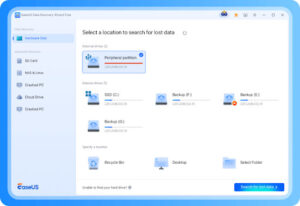
The free version of EaseUS data recovery software allows you to restore files deleted due to formatting, deleting, OS crash, virus infection, and other reasons. This all-rounder data recovery software is also known for its clean and friendly interface, allowing you to restore files in a few simple clicks. perform both a “Quick Scan” and a deeper “Deep Scan” to find files that have been removed or from formatted partitions.
Pros:
- Preview functionality allows you to see recoverable files before saving.
- Allows recovery of files deleted from many devices, including USB, external drive, memory card, etc.
- The free version allows you to test recovery and decide if you need to upgrade.
Cons:
- Deep scanning can be slow, especially while recovering files from large drives or heavily fragmented media.
- You might receive excessive promotional prompts or aggressive upsells to the paid version.
- Sometimes, the recovered files might not come up with the original filename/folder (mainly while recovering files from formatted drives).
3. Recuva
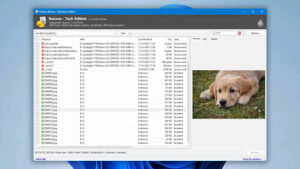
Recuva (developed by Piriform) is another long-standing free Windows recovery software tool. It allows you to restore deleted files in a few simple steps, while offering preview support and deep scanning capabilities. You can use the free version of this software to perform basic recovery on Windows PC.
Pros:
- It supports recovery of deleted photos, videos, documents, and other types of files across multiple file formats.
- Supports basic deep scan, formatted drive recovery (to some extent) and external/removable media.
- 100% safe and secure Windows data recovery software. Also, quick to install and run.
Cons:
- It might be difficult or time-consuming to recover files deleted due to complex scenarios (like formatted partitions, severely corrupted drives).
- The free version of this software may lack premium features like virtual hard drive support, automatic updates, and priority support.
- Interface and update path seem less active compared to newer tools.
4. DMDE Free Edition
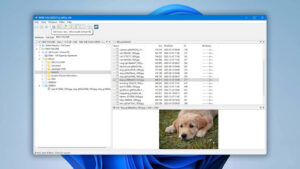
This free data recovery software easily supports the recovery of files from many file systems. You can use this tool to restore files lost/deleted due to partition issues, disk editing, or even complex data loss situations. It not only recovers deleted files but also helps reconstruct lost or damaged partitions, fix file system errors, and even access disks that appear completely unformatted or RAW in Windows Explorer.
Pros:
- Strong capability in complex scenarios and can easily restore files from multiple file systems (NTFS, FAT, exFAT, ext2/3/4, etc
- Multiple versions available; good for tech-savvy users comfortable with disk-level operations.
- The built-in hex editor allows users to manually inspect, analyse, and even repair corrupted sectors, partition tables, or MFT records.
Cons:
- The interface might look complex and may be difficult for non-tech users or beginners.
- This software is primarily designed for Windows, offering direct recovery support, while Linux and macOS users must rely on command-line or alternative builds to perform similar tasks.
- DMDE focuses on raw accuracy and file structure integrity, so the preview and thumbnail display are less refined.
5. TestDisk (& its companion PhotoRec)
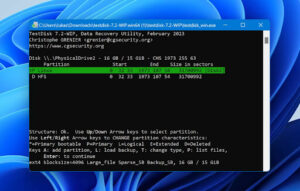
TestDisk (and PhotoRec) are powerful, open-source data recovery tools, known for offering free data recovery across multiple OS, including Windows, macOS, and Linux. While the software doesn’t offer a polished graphical interface, its raw power and effectiveness in deep-level recovery operations make it effective even for complex data loss instances.
Pros:
- Completely free and open source, allowing recovery of files deleted from different storage devices.
- Supports numerous file systems, including NTFS, FAT, exFAT, ext2/3/4, HFS+, and more.
- Comes with PhotoRec, allowing both partition and file-level recovery.
Cons:
- Command-line interface may intimidate beginners and lack GUI convenience.
- No real-time file previews or recovery progress visualisation.
- Requires technical understanding — improper use can worsen data loss.
Final Thoughts
Data loss instances can put you in trouble, but free data recovery software can help you recover those lost files without any cost. Among the several recovery tools available, the aforementioned top 5 free data recovery software of 2025 stand out for their reliability and efficiency. Before selecting any specific tool, carefully check all its features, limitations, and compatibility to ensure it meets your needs. Always remember: Choosing the right data recovery software can ease your recovery, even if the data has been overwritten or the drive has physically failed.